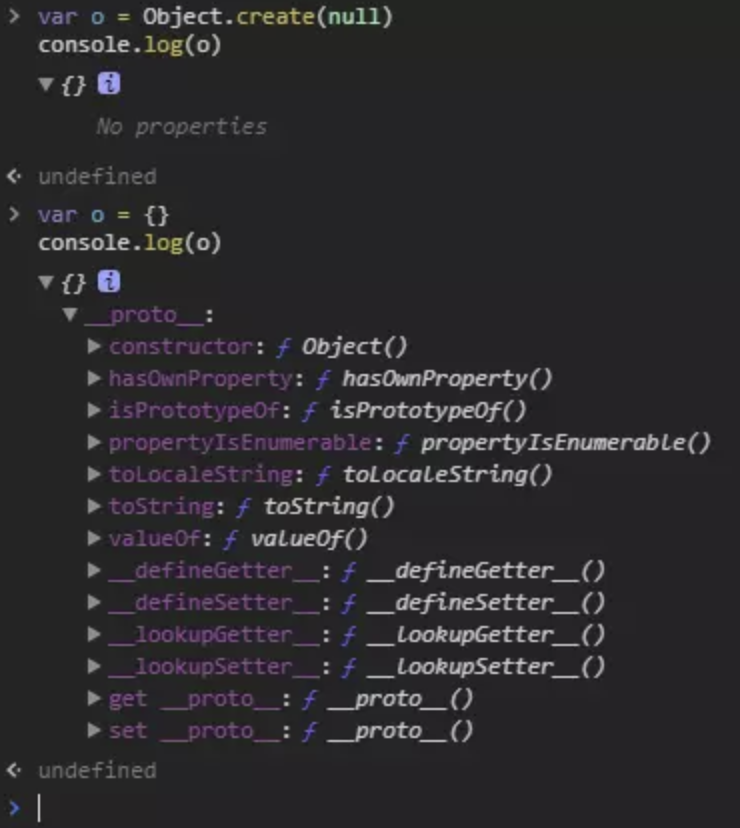
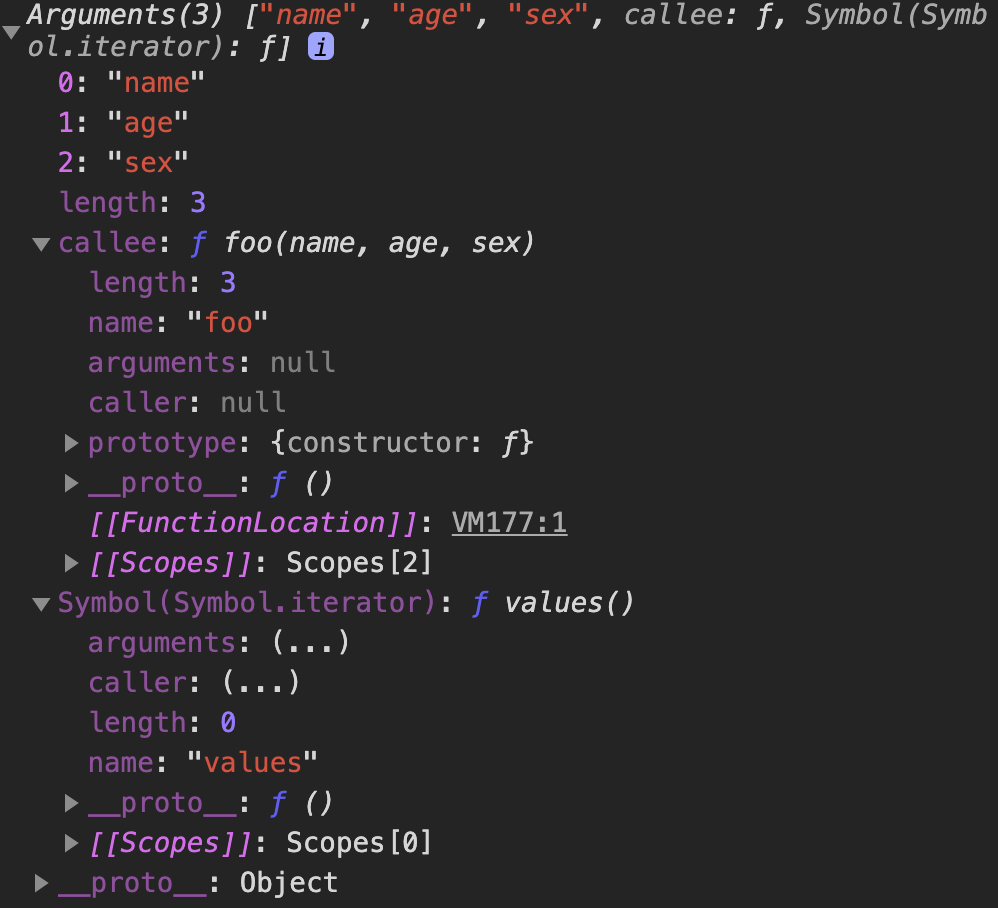
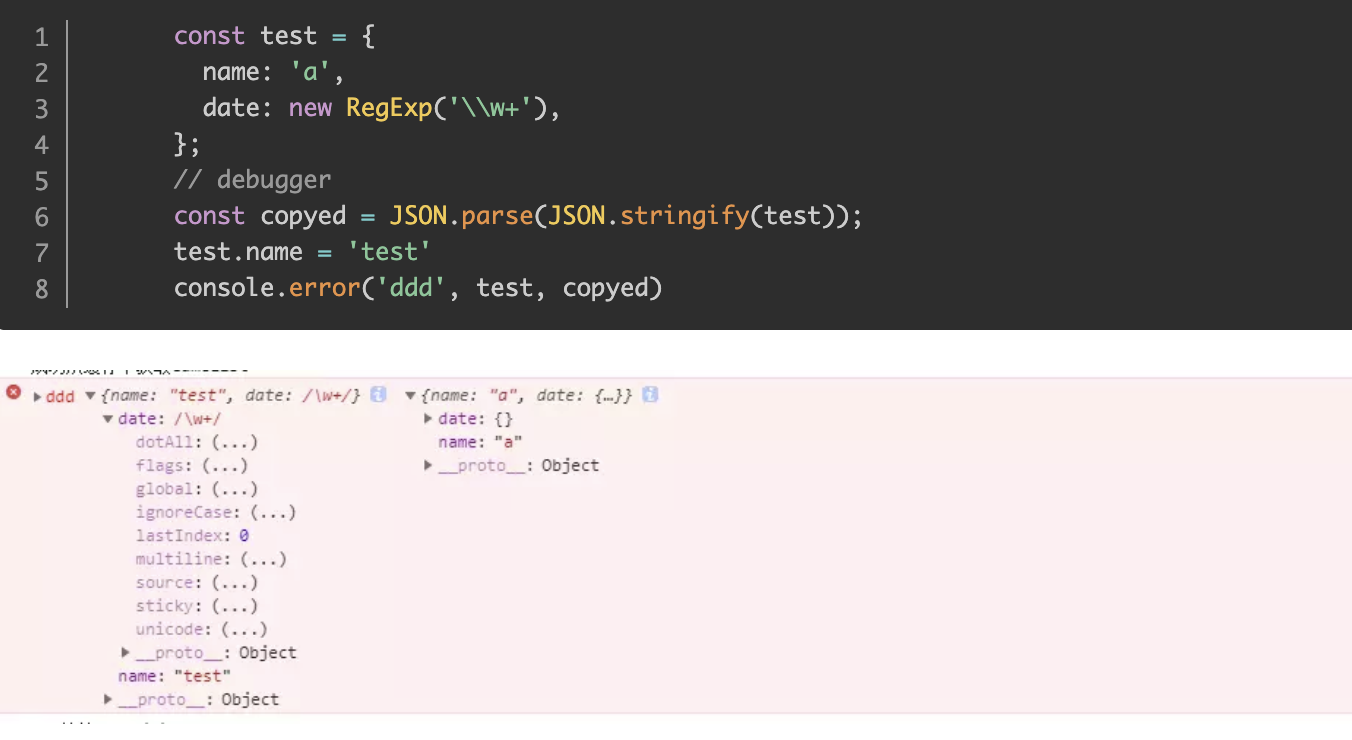
0%

JS部分API实现

1.call、apply和bind

简介

apply、call、bind的作用都是改变运行时上下文的(即函数中的this对象),区别是apply和call是立即执行,而bind的作用是改变运行上下文后返回新的函数,用于以后执行的函数。

apply和call的区别在于使用方式不同,apply中传递的参数是一个数组,而call则是传递了一系列参数

call

call() 方法在使用一个指定的 this 值和若干个指定的参数值的前提下调用某个函数或方法

1
2
3
4
5
6
7
8
9
var foo = {
value: 1
};

function bar() {
console.log(this.value);
}

bar.call(foo); // 1

注意两点:

  1. call 改变了 this 的指向,指向到 foo
  2. bar 函数执行了
1
2
3
4
5
6
7
8
9
10
11
12
13
14
15
16
17
18
19
20
21
22
23
24
25
26
27
28
29
30
31
32
33
34
35
36
37
Function.prototype.call2 = function (context) {
var context = context || window
context.fn = this
var args = []
for (var i = 1, len = arguments.length;i < len;i++) {
args.push('arguments[' + i + ']')
}
var result = eval('context.fn(' + args + ')')
delete context.fn
return result
}

// 测试一下
var value = 2;

var obj = {
value: 1
}

function bar(name, age) {
console.log(this.value);
return {
value: this.value,
name: name,
age: age
}
}

bar.call2(null); // 2

console.log(bar.call2(obj, 'kevin', 18));
// 1
// Object {
// value: 1,
// name: 'kevin',
// age: 18
// }

eval函数接收参数是个字符串

定义和用法

eval() 函数可计算某个字符串,并执行其中的的 JavaScript 代码。

语法:
eval(string)

string必需。要计算的字符串,其中含有要计算的 JavaScript 表达式或要执行的语句。该方法只接受原始字符串作为参数,如果 string 参数不是原始字符串,那么该方法将不作任何改变地返回。因此请不要为 eval() 函数传递 String 对象来作为参数。

简单来说吧,就是用JavaScript的解析引擎来解析这一堆字符串里面的内容,这么说吧,你可以这么理解,你把eval看成是<script>标签。

1
eval('function Test(a,b,c,d){console.log(a,b,c,d)};Test(1,2,3,4)')

==难点解析:==

1
2
3
4
var args = [];
for(var i = 1, len = arguments.length; i < len; i++) {
args.push('arguments[' + i + ']');
}

最终的数组为:

1
var args = [arguments[1], arguments[2], ...]

然后

1
var result = eval('context.fn(' + args +')');

在eval中,args 自动调用 args.toString()方法,最终的效果相当于:

1
var result = context.fn(arguments[1], arguments[2], ...);

这样就做到了把传给call的参数传递给了context.fn函数

1
2
3
4
5
6
7
8
//call ES6版本
Function.prototype.callEs6 = function (context, ...args) {
context = context || window;
context.fn = this; //挂载到context下的fn中
let result = context.fn(...args);
delete context.fn;
return result;
}
1
2
3
4
5
6
7
8
Function.prototype.callSym = function (context, ...args) {
context = context || window;
let fn = Symbol();
context[fn] = this;
let result = context[fn](...args);
Reflect.deleteProperty(context, fn);
return result;
}

apply

  • 首先要先原型上即 Function.prototype上编程
  • 需要拿到函数的引用, 在这里是 this
  • 让传入对象.fn = this
  • 执行传入对象.fn(传入参数)
  • 返回执行结果
1
2
3
4
5
6
7
8
9
10
11
12
13
14
15
16
17
//apply
Function.prototype.apply2 = function (context) {
if(typeof this !== 'function') {
throw new TypeError('Error')
}
context = context || window
context.fn = this

let result
if (arguments[1]) {
result = context.fn(...arguments[1])
} else {
result = context.fn()
}
delete context.fn
return result;
}

==call和apply的区别仅仅是:==

call是通过传多个参数的方式,而apply则是传入一个数组。

bind

bind() 方法会创建一个新函数。当这个新函数被调用时,bind() 的第一个参数将作为它运行时的 this,之后的一序列参数将会在传递的实参前传入作为它的参数。

  • 因为bind的使用方法是 某函数.bind(某对象,…剩余参数)
    • 所以需要在Function.prototype 上进行编程
  • 将传递的参数中的某对象和剩余参数使用apply的方式在一个回调函数中执行即可
  • 要在第一层获取到被绑定函数的this,因为要拿到那个函数用apply

简单版

1
2
3
4
5
6
Function.prototype.myBind = (context, ...args) => {
const funcThis = this;
return function(...bindArgs) {
return funcThis.apply(context, args.concat(bindArgs));
}
}

进阶版

一个绑定函数也能使用new操作符创建对象:这种行为就像把原函数当成构造器。提供的 this 值被忽略,同时调用时的参数被提供给模拟函数。

1
2
3
4
5
6
7
8
9
10
11
12
13
14
15
16
17
18
19
20
21
22
23
24
25
var value = 2;

var foo = {
value: 1
};

function bar(name, age) {
this.habit = 'shopping';
console.log(this.value);
console.log(name);
console.log(age);
}

bar.prototype.friend = 'kevin';

var bindFoo = bar.bind(foo, 'daisy');

var obj = new bindFoo('18');
// undefined
// daisy
// 18
console.log(obj.habit);
console.log(obj.friend);
// shopping
// kevin
1
2
3
4
5
6
7
8
9
10
11
12
Function.prototype.bindEs6 = function (context, ...rest) {
if (typeof this !== 'function') {
throw new TypeError('invalid invoked!')
}
var self = this;
return function F(...args) {
if (this instanceof F) {
return new self(...rest, ...args);
}
return self.apply(context, rest.concat(args));
}
}
1
2
3
4
5
6
7
8
9
10
11
12
13
14
15
16
17
18
19
20
21
22
23
24
25
Function.prototype.bind2 = function (context) {

if (typeof this !== "function") {
throw new Error("Function.prototype.bind - what is trying to be bound is not callable");
}

var self = this;
//获取bind2函数从第二个参数到最后一个参数
var args = Array.prototype.slice.call(arguments, 1);

var fNOP = function () {};

var fBound = function () {
//转换类数组元素 arguments 为数组元素,方便使用数组方法,比如后面的 array.concat()
var bindArgs = Array.prototype.slice.call(arguments);
// 当作为构造函数时,this 指向实例,此时结果为 true,将绑定函数的 this 指向该实例,可以让实例获得来自绑定函数的值
// 以上面的是 demo 为例,如果改成 `this instanceof fBound ? null : context`,实例只是一个空对象,将 null 改成 this ,实例会具有 habit 属性
// 当作为普通函数时,this 指向 window,此时结果为 false,将绑定函数的 this 指向 context
return self.apply(this instanceof fNOP ? this : context, args.concat(bindArgs));
}

fNOP.prototype = this.prototype;
fBound.prototype = new fNOP();
return fBound;
}

2.new

new的模拟实现

new 运算符创建一个用户定义的对象类型的实例或具有构造函数的内置对象类型之一

1
2
3
var obj  = {};
obj.__proto__ = F.prototype;
F.call(obj);

new运算符具体干了三件事:

  1. 创建一个空对象obj
  2. 将这个空对象的proto成员指向了F函数对象prototype成员对象
  3. 将F函数对象的this指针替换成obj,然后再调用F函数
1
2
3
4
5
6
7
8
function objectFactory() {
let args = Array.prototype.slice.call(arguments);
let Constructor = args.shift();
let instance = Object.create(Constructor.prototype);
let temp = Constructor.apply(instance, args);

return (typeof temp === 'object' && temp !== null) ? temp : instance;
}
1
2
3
4
5
6
7
8
9
10
11
12
13
14
15
16
17
18
19
20
21
22
23
24
25
26
27
28
29
30
31
32
33
34
35
function objectFactory() {

var obj = new Object(),//从Object.prototype上克隆一个对象

Constructor = [].shift.call(arguments);//取得外部传入的构造器

obj.__proto__ = Constructor.prototype;

var ret = Constructor.apply(obj, arguments);
//改变构造函数 this 的指向到新建的对象,这样obj就可以访问到构造函数中的属性
//obj代替Constructor中this对象

return typeof ret === 'object' ? ret : obj;//确保构造器总是返回一个对象

};

function Otaku (name, age) {
this.name = name;
this.age = age;

this.habit = 'Games';
}

Otaku.prototype.strength = 60;

Otaku.prototype.sayYourName = function () {
console.log('I am ' + this.name);
}
var person = objectFactory(Otaku, 'Kevin', '18')

console.log(person.name) // Kevin
console.log(person.habit) // Games
console.log(person.strength) // 60

person.sayYourName(); // I am Kevin

Object.create() 和 new Object()的区别

使用create创建的对象,没有任何属性,显示No properties,我们可以把它当作一个非常纯净的map来使用,我们可以自己定义hasOwnPropertytoString方法,不管是有意还是不小心,我们完全不必担心会将原型链上的同名方法覆盖掉。

1
Object.create(proto,[propertiesObject])
  • proto:新创建对象的原型对象
  • propertiesObject:可选。要添加到新对象的可枚举(新添加的属性是其自身的属性,而不是其原型链上的属性)的属性。

创建一个新对象,使用现有的对象来提供新创建的对象的__proto__

new Object()创建的对象纯净么?

首先什么是纯净?我们定义一个对象的__proto__属性为空的对象是一个纯净的对象。

然而new Object()创建出来的是对象__proto__指向Object.prototype,所以不是纯净的。

我们有必要引出Object.create(),该方法创建一个新对象,使用现有的对象来提供新创建的对象的__proto__

Object.create实现

1
2
3
4
5
6
function create(proto) {
function F() {};
F.prototype = proto;
F.prototype.constructor = F;
return new F();
}

3.类数组对象

类数组对象

类数组对象:

拥有一个 length 属性和若干索引属性的对象

从读写、获取长度和遍历来看无差别,但不能用数组的方法,所以叫类数组

1
2
3
4
5
6
7
8
var array = ['name', 'age', 'sex'];

var arrayLike = {
0: 'name',
1: 'age',
2: 'sex',
length: 3
}

调用数组的方法

1
2
3
4
5
6
7
8
9
Array.prototype.join.call(arrayLike, '&'); // name&age&sex

Array.prototype.slice.call(arrayLike, 0); // ["name", "age", "sex"]
// slice可以做到类数组转数组

Array.prototype.map.call(arrayLike, function(item){
return item.toUpperCase();
});
// ["NAME", "AGE", "SEX"]

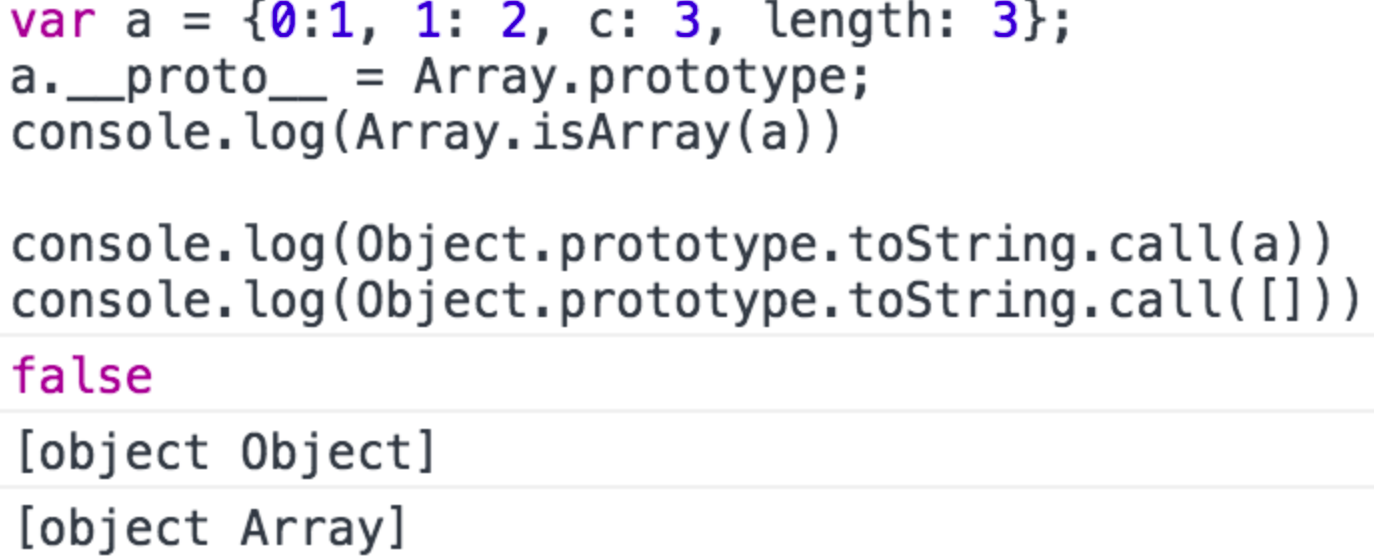
把原型指向Array.prototype后就可以调用Array.prototype上的方法,行为上确实是跟数组一样,然而Array.isArray和Object.prototype.toString不认
类数组转数组

1
2
3
4
5
6
7
8
9
var arrayLike = {0: 'name', 1: 'age', 2: 'sex', length: 3 }
// 1. slice
Array.prototype.slice.call(arrayLike); // ["name", "age", "sex"]
// 2. splice
Array.prototype.splice.call(arrayLike, 0); // ["name", "age", "sex"]
// 3. ES6 Array.from
Array.from(arrayLike); // ["name", "age", "sex"]
// 4. apply
Array.prototype.concat.apply([], arrayLike)

slice和splice的区别:

  1. slice(start,end):方法可从已有数组中返回选定的元素,返回一个新数组,包含从start到end(不包含该元素)的数组元素

  2. splice():该方法向或者从数组中添加或者删除项目,返回被删除的项目。(==该方法会改变原数组==)

    splice(index,howmany,item1,…itemX)

那么为什么会讲到类数组对象呢?以及类数组有什么应用吗?

要说到类数组对象,Arguments 对象就是一个类数组对象。在客户端JavaScript中一些DOM方法(document.getElementsByTagName()等)也返回==类数组对象==。

对于 HTMLCollection,length 属性为只读,splice 底层还是会修改 length 的长度,这才导致了报错。

1
2
3
4
5
6
7
let  elements = document.getElementsByClassName('box');

Array.prototype.splice.call(elements, 0);

// Uncaught TypeError: Cannot assign to read only property 'length' of object '#<HTMLCollection>'

// slice方法可以

Arguments对象

Arguments 对象只定义在函数体中,包括了函数的参数和其他属性。在函数体中,arguments 指代该函数的 Arguments 对象。

1
2
3
4
5
function foo(name, age, sex) {
console.log(arguments);
}

foo('name', 'age', 'sex')

打印结果如下:

length属性

Arguments对象的length属性,表示实参的长度,举个例子:

1
2
3
4
5
6
7
8
9
10
function foo(b, c, d){
console.log("实参的长度为:" + arguments.length)
}

console.log("形参的长度为:" + foo.length)

foo(1)

// 形参的长度为:3
// 实参的长度为:1

callee属性

Arguments 对象的 callee 属性,通过它可以调用函数自身。

讲个闭包经典面试题使用 callee 的解决方法:

1
2
3
4
5
6
7
8
9
10
11
12
13
14
15
var data = [];

for (var i = 0; i < 3; i++) {
(data[i] = function () {
console.log(arguments.callee.i)
}).i = i;
}

data[0]();
data[1]();
data[2]();

// 0
// 1
// 2

函数也是一种对象,我们可以通过这种方式给函数添加一个自定义的属性。
这个解决方式就是给 data[i] 这个函数添加一个自定义属性,这个属性值就是正确的 i 值。

接下来讲讲 arguments 对象的几个注意要点:

arguments 和对应参数的绑定

1
2
3
4
5
6
7
8
9
10
11
12
13
14
15
16
17
18
19
20
21
22
23
24
25
26
27
28
function foo(name, age, sex, hobbit) {

console.log(name, arguments[0]); // name name

// 改变形参
name = 'new name';

console.log(name, arguments[0]); // new name new name

// 改变arguments
arguments[1] = 'new age';

console.log(age, arguments[1]); // new age new age

// 测试未传入的是否会绑定
console.log(sex); // undefined

sex = 'new sex';

console.log(sex, arguments[2]); // new sex undefined

arguments[3] = 'new hobbit';

console.log(hobbit, arguments[3]); // undefined new hobbit

}

foo('name', 'age')

传入的参数,实参和 arguments 的值会共享,当没有传入时,实参与 arguments 值不会共享

除此之外,以上是在非严格模式下,如果是在严格模式下,实参和 arguments 是不会共享的。

传递参数

将参数从一个函数传递到另一个函数

1
2
3
4
5
6
7
8
9
// 使用 apply 将 foo 的参数传递给 bar
function foo() {
bar.apply(this, arguments);
}
function bar(a, b, c) {
console.log(a, b, c);
}

foo(1, 2, 3)

强大的ES6

使用ES6的 … 运算符,我们可以轻松转成数组。

1
2
3
4
5
function func(...arguments) {
console.log(arguments); // [1, 2, 3]
}

func(1, 2, 3);

4.数组去重

双层循环

缺点:

对象和NaN不会去重

NaN===NaN //false

{}==={} //false

1
2
3
4
5
6
7
8
9
10
11
12
13
14
15
16
//双层循环
let array = [1, 1, '1', '1', 'str', 'str', {a: 1}, {a: 1}, NaN, NaN];

function unique(arr) {
let res = [];
for (let i = 0; i < arr.length; i++) {
let j = 0;
for (; j < res.length; j++) {
if (arr[i] === res[j]) break;
}
if (j === res.length) res.push(arr[i]);
}
return res;
}

console.log(unique(array)); // [ 1, '1', 'str', { a: 1 }, { a: 1 }, NaN, NaN ]

indexOf

indexOf简化内层循环

缺点和上述方法一样,因为indexOf底层还是用的===

1
2
3
4
5
6
7
8
9
10
11
12
13
let array = [1, 1, '1', '1', 'str', 'str', {a: 1}, {a: 1}, NaN, NaN];

function unique(arr) {
let res = [];
for (let i = 0; i < arr.length; i++) {
if (res.indexOf(arr[i]) === -1) {
res.push(arr[i]);
}
}
return res;
}

console.log(unique(array)); // [ 1, '1', 'str', { a: 1 }, { a: 1 }, NaN, NaN ]

排序后去重

先将要去重的数组使用 sort 方法排序后,相同的值就会被排在一起,然后我们就可以只判断当前元素与上一个元素是否相同,相同就说明重复,不相同就添加进 res。

缺点:

除了对象NaN不去重,数字1也不去重

[ 1, ‘1’, ‘1’, 1, NaN, NaN, { a: 1 }, { a: 1 }, ‘str’, ‘str’ ]

可以看到sort排序会出现上述的情况,所以1无法去重。

1
2
3
4
5
6
7
8
9
10
11
12
13
14
15
16
let array = [1, '1', '1', 1, 'str', 'str', {a: 1}, {a: 1}, NaN, NaN];

function unique(arr) {
let res = [],
sortedArr = arr.concat().sort(),
//你对数组进行了 array.concat()操作之后,相当于复制出来一份原有的数组,
//且对复制出来的新数组的操作不会影响到原有数组
seen;
for (let i = 0, len = sortedArr.length; i < len; i++) {
if (!i || seen !== sortedArr[i]) res.push(sortedArr[i]);
seen = sortedArr[i];
}
return res;
}

console.log(unique(array)); // [ 1, '1', 1, NaN, NaN, { a: 1 }, { a: 1 }, 'str' ]

filter

ES5 提供了 filter 方法,我们可以用来简化外层循环:

比如使用 indexOf 的方法:

filter+indexOf缺点:

对象无法去重,NaN会被忽略掉

indexOf 底层还是使用 === 进行判断,因为 NaN === NaN的结果为 false,所以使用 indexOf 查找不到 NaN 元素

1
2
3
4
5
6
7
8
9
let array = [1, '1', '1', 1, 'str', 'str', {a: 1}, {a: 1}, NaN, NaN];

function unique(arr) {
return arr.filter((item, index, array) => {
return array.indexOf(item) === index;
})
}

console.log(unique(array)); // [ 1, '1', 'str', { a: 1 }, { a: 1 } ]

排序去重的方法:

filter+sort缺点:

对象NaN无法去重,数字1不去重

1
2
3
4
5
6
7
8
9
let array = [1, '1', '1', 1, 'str', 'str', {a: 1}, {a: 1}, NaN, NaN];

function unique(arr) {
return arr.concat().sort().filter((item, index, array) => {
return !index || item !== array[index - 1];
})
}

console.log(unique(array)); // [ 1, '1', 1, NaN, NaN, { a: 1 }, { a: 1 }, 'str' ]

Object 键值对

这种方法是利用一个空的 Object 对象,我们把数组的值存成 Object 的 key 值,比如 Object[value1] = true,在判断另一个值的时候,如果 Object[value2]存在的话,就说明该值是重复的。因为 1 和 ‘1’ 是不同的,但是这种方法会判断为同一个值,这是因为对象的键值只能是字符串,所以我们可以使用 typeof item + item 拼成字符串作为 key 值来避免这个问题:然而,即便如此,我们依然无法正确区分出两个对象,比如 {value: 1} 和 {value: 2},因为 typeof item + item 的结果都会是 object[object Object],不过我们可以使用JSON.stringify将对象序列化:

1
2
3
4
5
6
7
8
9
10
let array = [1, '1', '1', 1, null, undefined, null, undefined, new String('1'), /a/, new String('1'), / a /, NaN, NaN];

function unique(arr) {
let obj = {};
return arr.filter((item, index) => {
return obj.hasOwnProperty(typeof item + JSON.stringify(item)) ? false : obj[typeof item + JSON.stringify(item)] = true;
})
}

console.log(unique(array)); //[ 1, '1', null, undefined, [String: '1'], /a/, NaN ]

ES6

对象不去重,NaN去重

1
2
3
4
5
6
7
8
let array = [1, '1', '1', 1, null, undefined, null, undefined, new String('1'), /a/, new String('1'), / a /, NaN, NaN];

function unique(arr) {
return Array.from(new Set(arr));//Array.from将可迭代对象转换成数组
}

console.log(unique(array));
//[1, '1', null, undefined, [String: '1'], /a/, [String: '1'], / a /, NaN]

简化版:

1
let unique = (arr) => [...new Set(arr)]

Map

对象不去重,NaN去重

1
2
3
4
5
6
7
8
9
let array = [1, '1', '1', 1, null, undefined, null, undefined, new String('1'), /a/, new String('1'), / a /, NaN, NaN];

function unique(arr) {
const seen = new Map();
return arr.filter((item) => !seen.has(item) && seen.set(item, 1))
}

console.log(unique(array));
//[1, '1', null, undefined, [String: '1'], /a/, [String: '1'], / a /, NaN]

5.数组扁平化

扁平化

数组的扁平化,就是将一个嵌套多层的数组 array (嵌套可以是任何层数)转换为只有一层的数组。

递归

1
2
3
4
5
6
7
8
9
10
11
12
13
14
15
16
// 方法 1
let arr = [1, [2, [3, 4]]];

function flatten(arr) {
let res = [];
for (let i = 0, len = arr.length; i < len; i++) {
if (Array.isArray(arr[i])) {
res.push(...flatten(arr[i]));
} else {
res.push(arr[i]);
}
}
return res;
}

console.log(flatten(arr));

toString

如果数组的元素都是数字,那么我们可以考虑使用 toString 方法,因为:

1
[1, [2, [3, 4]]].toString() // "1,2,3,4"

调用 toString 方法,返回了一个逗号分隔的扁平的字符串,这时候我们再 split,然后转成数字不就可以实现扁平化了吗?

1
2
3
4
5
6
7
8
// 方法2
let arr = [1, [2, [3, 4]]];

function flatten(arr) {
return arr.toString().split(',').map((item) => +item);
}

console.log(flatten(arr));

然而这种方法使用的场景却非常有限,如果数组是 [1, ‘1’, 2, ‘2’] 的话,这种方法就会产生错误的结果。

reduce

既然是对数组进行处理,最终返回一个值,我们就可以考虑使用 reduce 来简化代码:

1
2
3
4
5
6
7
8
9
10
// 方法3
let arr = [1, [2, [3, 4]]];

function flatten(arr) {
return arr.reduce((cur, next) => {
return cur.concat(Array.isArray(next) ? flatten(next) : next);
}, [])
}

console.log(flatten(arr))

ES6

ES6 增加了扩展运算符,用于取出参数对象的所有可遍历属性,拷贝到当前对象之中:

1
2
let arr = [1, [2, [3, 4]]];
console.log([].concat(...arr)); // [1, 2, [3, 4]]

我们用这种方法只可以扁平一层,但是顺着这个方法一直思考,我们可以写出这样的方法:

1
2
3
4
5
6
7
8
9
10
11
// 方法4
let arr = [1, [2, [3, 4]]];

function flatten(arr) {
while (arr.some(item => Array.isArray(item))) {
arr = [].concat(...arr);
}
return arr;
}

console.log(flatten(arr))

6.深拷贝、浅拷贝

基本类型值和引用类型值

  1. 基本类型值基本类型值指的是存储在栈中的一些简单的数据段

    在JavaScript中基本数据类型有String,Number,Undefined,Null,Boolean,在ES6中,又定义了一种新的基本数据类型Symbol,所以一共有6种。

    基本类型是按值访问的,从一个变量复制基本类型的值到另一个变量后这2个变量的值是完全独立的,即使一个变量改变了也不会影响到第二个变量。

1
2
3
4
5
let str1 = 'a';
let str2 = str1;
str2 = 'b';
console.log(str2); //'b'
console.log(str1); //'a'
  1. 引用类型值 引用类型值是引用类型的实例,它是保存在堆内存中的一个对象,引用类型是一种数据结构,最常用的是Object,Array,Function类型,另外还有Date,RegExp,Error等,ES6同样也提供了Set,Map2种新的数据结构

数组的浅拷贝

Object.assign

语法:Object.assign(target, …sources)

1
2
3
4
5
6
7
let target = {};
let source = { a: { b: 2 } };
Object.assign(target, source);
console.log(target); // { a: { b: 10 } };
source.a.b = 10;
console.log(source); // { a: { b: 10 } };
console.log(target); // { a: { b: 10 } };

Object.assign 只是在根属性(对象的第一层级)创建了一个新的对象,但是对于属性的值是对象的话只会拷贝一份相同的内存地址。

  • 不会拷贝对象继承的属性
  • 不会拷贝不可枚举的属性
  • 属性的数据属性/访问器属性
  • 可以拷贝Symbol类型

扩展运算符

1
2
3
4
5
6
let a = {
age: 1
}
let b = {...a};
a.age = 2;
console.log(b.age) // 1

slice和concat

可以利用一些数组的方法实现浅拷贝,比如说slice、concat

如果数组嵌套了对象或者数组的话,比如:

1
2
3
4
5
6
7
8
9
var arr = [{old: 'old'}, ['old']];

var new_arr = arr.concat();

arr[0].old = 'new';
arr[1][0] = 'new';

console.log(arr) // [{old: 'new'}, ['new']]
console.log(new_arr) // [{old: 'new'}, ['new']]

我们会发现,无论是新数组还是旧数组都发生了变化,也就是说使用 concat 方法,克隆的并不彻底。

如果数组元素是基本类型,就会拷贝一份,互不影响,而如果是对象或者数组,就会只拷贝对象和数组的引用,这样我们无论在新旧数组进行了修改,两者都会发生变化。

我们把这种复制引用的拷贝方法称之为浅拷贝,与之对应的就是深拷贝,深拷贝就是指完全的拷贝一个对象,即使嵌套了对象,两者也相互分离,修改一个对象的属性,也不会影响另一个。

所以我们可以看出使用 concat 和 slice 是一种浅拷贝

数组的深拷贝

那如何深拷贝一个数组呢?这里介绍一个技巧,不仅适用于数组还适用于对象!那就是:

1
2
3
4
5
var arr = ['old', 1, true, ['old1', 'old2'], {old: 1}]

var new_arr = JSON.parse( JSON.stringify(arr) );

console.log(new_arr);

缺点是==不能拷贝函数==

JSON.parse(JSON.stringify(obj))实现深拷贝应该注意的坑

所有安全的JSON值(JSON-safe)都可以使用JSON.stringify(..)字符串化。安全的JSON值是指能够呈现为有效JSON格式的值。

下面敲黑板划重点:

为了简单起见,我们来看看什么是不安全的JSON值 。undefined 、function 、symbol (ES6+)和包含循环引用(对象之间相互引用,形成一个无限循环)的对象都不符合JSON结构标准,支持JSON的语言无法处理它们。

JSON.stringify(..) 在对象中遇到 undefined 、 function 和 symbol 时会自动将其忽略,在数组中则会返回null(以保证单元位置不变),对包含循环引用的对象执行JSON.stringify(..)会出错。

利用JSON.stringify 将js对象序列化(JSON字符串),再使用JSON.parse来反序列化(还原)js对象;序列化的作用是存储(对象本身存储的只是一个地址映射,如果断电,对象将不复存在,因此需将对象的内容转换成字符串的形式再保存在磁盘上 )和传输(例如 如果请求的Content-Typeapplication/x-www-form-urlencoded,则前端这边需要使用qs.stringify(data)来序列化参数再传给后端,否则后端接受不到; ps: Content-Typeapplication/json;charset=UTF-8或者 multipart/form-data 则可以不需要 );我们在使用 JSON.parse(JSON.stringify(xxx))时应该注意一下几点:

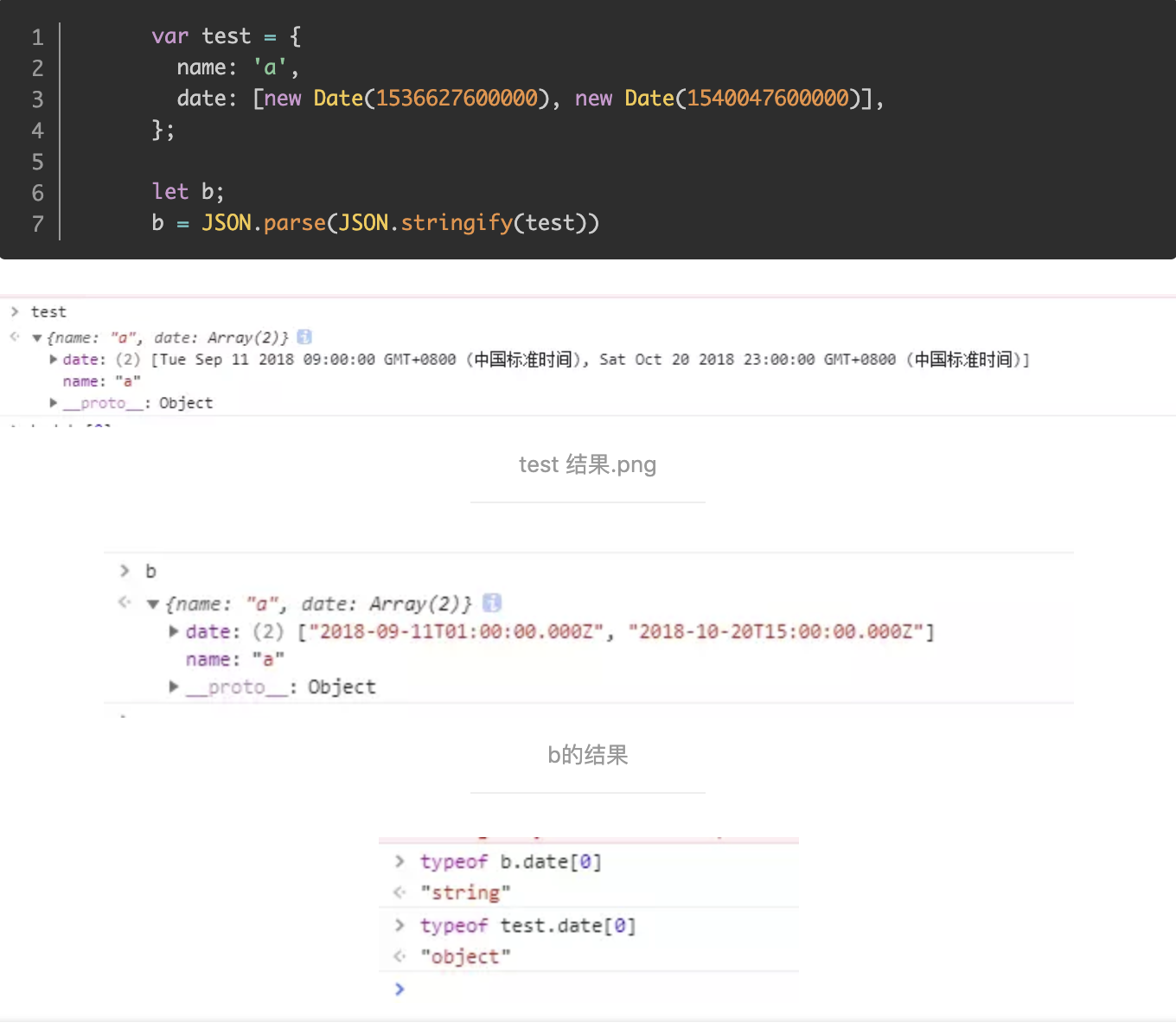
  1. 如果obj里面有时间对象,则JSON.stringify后再JSON.parse的结果,时间将只是字符串的形式。而不是时间对象
  2. 如果obj里有RegExp、Error对象,则序列化的结果将只得到空对象

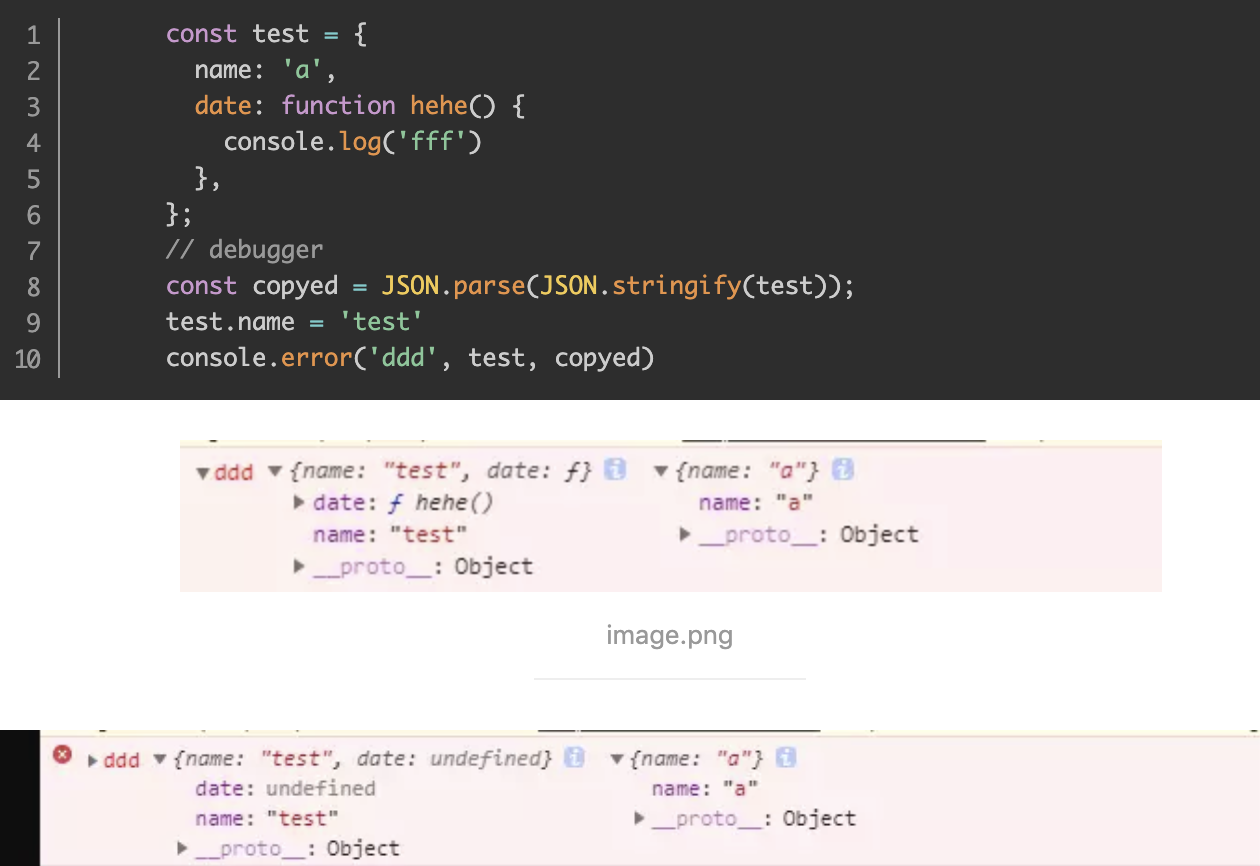
  3. 如果obj里有函数,undefined,则序列化的结果会把函数或 undefined丢失
  4. 如果obj里有NaN、Infinity和-Infinity,则序列化的结果会变成null

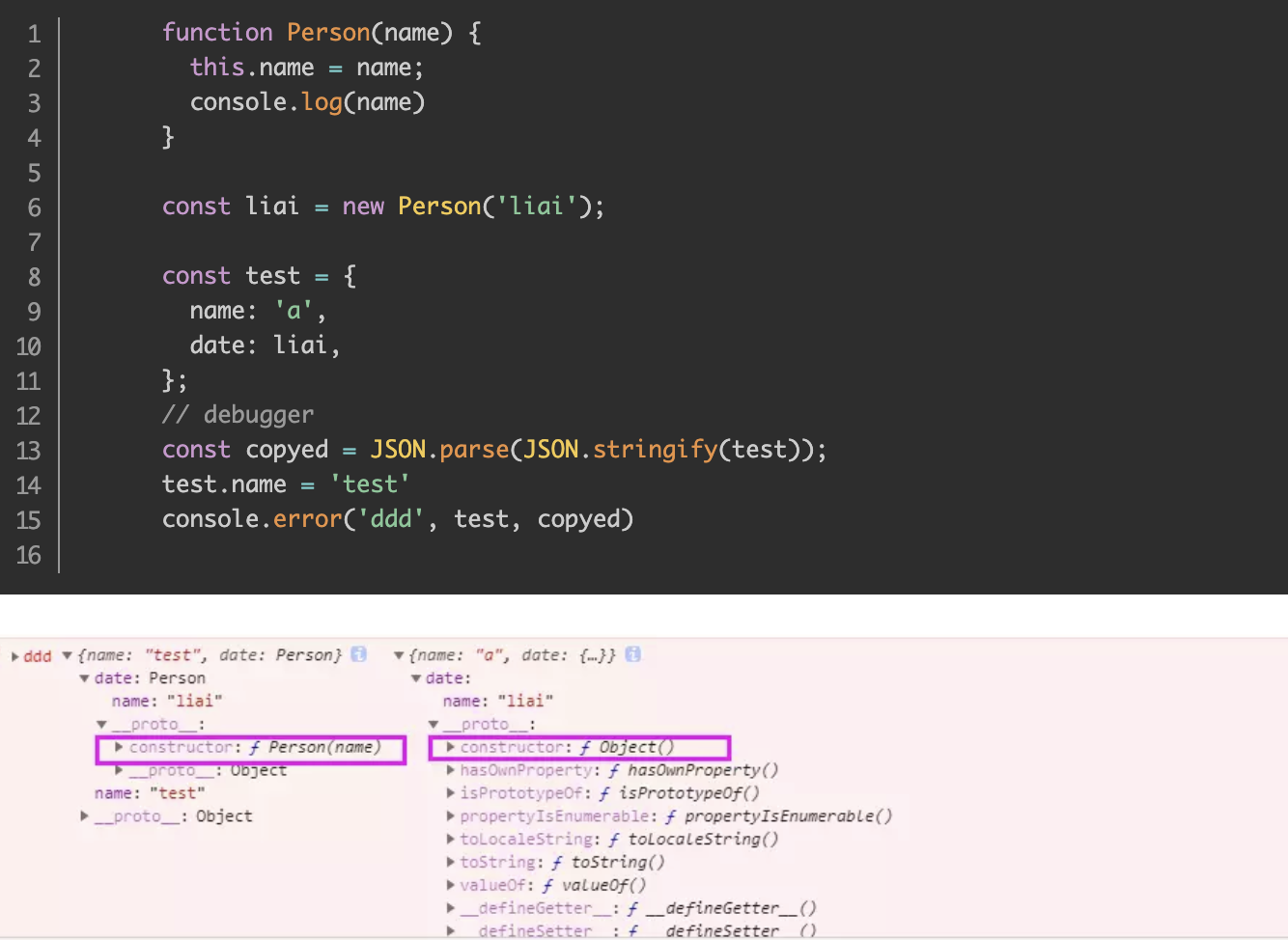
  5. JSON.stringify()只能序列化对象的可枚举的自有属性,例如 如果obj中的对象是有构造函数生成的, 则使用JSON.parse(JSON.stringify(obj))深拷贝后,会丢弃对象的constructor
  6. 如果对象中存在循环引用的情况也无法正确实现深拷贝

深拷贝的实现

  1. 递归

    1
    2
    3
    4
    5
    6
    7
    8
    9
    10
    11
    12
    13
    14
    15
    16
    17
    let deepCopy = function (obj) {
    let newObj = obj instanceof Array ? [] : {};
    for (let key in obj) {
    if (obj.hasOwnProperty(key)) {
    newObj[key] = typeof obj[key] === 'object' ? deepCopy(obj[key]) : obj[key];
    }
    }
    return newObj;
    }

    let obj1={a:{b:1},c:1};
    let obj2=deepCopy(obj1);
    obj1.a.b=2;
    console.log(obj1);
    console.log(obj2);
    //{ a: { b: 2 }, c: 1 }
    //{ a: { b: 1 }, c: 1 }

    深拷贝因为递归的存在,性能会不如浅拷贝

  2. BFS

    1
    2
    3
    4
    5
    6
    7
    8
    9
    10
    11
    12
    13
    14
    15
    16
    17
    18
    19
    20
    21
    22
    23
    24
    25
    26
    27
    28
    29
    30
    31
    32
    33
    34
    35
    // 如果是对象/数组,返回一个空的对象/数组,
    // 都不是的话直接返回原对象
    function getEmptyArrOrObj(item) {
    let itemType = Object.prototype.toString.call(item)
    if (itemType === '[object Array]') {
    return [];
    }
    if (itemType === '[object Object]') {
    return {};
    }
    return item;
    }

    function deepCopyBFS(origin) {
    const queue = [];
    const map = new Map(); //记录出现过的对象,用来处理环
    let target = getEmptyArrOrObj(origin);
    queue.push([origin, target]);
    map.set(origin, target);
    while (queue.length) {
    let [ori, tar] = queue.shift();
    for (let key in ori) {
    if (ori.hasOwnProperty(key)) { // 不在原型上
    if (map.get(ori[key])) { // 处理环状
    tar[key] = map.get(ori[key]);
    continue;
    }
    tar[key] = getEmptyArrOrObj(ori[key]);
    queue.push([ori[key], tar[key]]);
    map.set(ori[key], tar[key]);
    }
    }
    }
    return target;
    }
  3. DFS

    1
    2
    3
    4
    5
    6
    7
    8
    9
    10
    11
    12
    13
    14
    15
    16
    17
    18
    19
    20
    21
    22
    23
    24
    25
    26
    27
    28
    29
    30
    31
    32
    33
    function getEmptyArrOrObj(item) {
    let itemType = Object.prototype.toString.call(item)
    if (itemType === '[object Array]') {
    return [];
    }
    if (itemType === '[object Object]') {
    return {};
    }
    return item;
    }

    function deepCopyDFS(origin) {
    const stack = [];
    const map = new Map();
    let target = getEmptyArrOrObj(origin);
    stack.push([origin, target]);
    map.set(origin, target);
    while (stack.length) {
    let [ori, tar] = stack.pop();
    for (let key in ori) {
    if (ori.hasOwnProperty(key)) {
    if (map.get(ori[key])) {
    tar[key] = map.get(ori[key]);
    continue;
    }
    tar[key] = getEmptyArrOrObj(ori[key]);
    stack.push([ori[key], tar[key]]);
    map.set(ori[key], tar[key]);
    }
    }
    }
    return target;
    }

7.如何判断俩个对象相等

ES5比较俩个值是否相等,只有俩个运算符:相等(==)运算符和严格相等运算符(===)

但都有缺点,前者会自动转换数据类型,后者的NaN不等于自身,以及+0等于-0。

JS缺乏一种运算,在所有环境中,只要俩个值是一样的,它们就应该相等。

ES6中的Object.is()相比===来说多了俩种判断:

  1. Object.is(NaN,NaN) //true
  2. Object.is(+0,-0) //false

背景

我们认为只要 === 的结果为 true,两者就相等,然而今天我们重新定义相等:

我们认为:

  1. NaN 和 NaN 是相等
  2. [1] 和 [1] 是相等
  3. {value: 1} 和 {value: 1} 是相等

不仅仅是这些长得一样的,还有

  1. 1 和 new Number(1) 是相等
  2. ‘Curly’ 和 new String(‘Curly’) 是相等
  3. true 和 new Boolean(true) 是相等

+0 与 -0

如果 a === b 的结果为 true, 那么 a 和 b 就是相等的吗?一般情况下,当然是这样的,但是有一个特殊的例子,就是 +0 和 -0。

JavaScript “处心积虑”的想抹平两者的差异:

1
2
3
4
5
6
7
8
9
10
// 表现1
console.log(+0 === -0); // true

// 表现2
(-0).toString() // '0'
(+0).toString() // '0'

// 表现3
-0 < +0 // false
+0 < -0 // false

即便如此,两者依然是不同的:

1
2
3
4
1 / +0 // Infinity
1 / -0 // -Infinity

1 / +0 === 1 / -0 // false

也许你会好奇为什么要有 +0 和 -0 呢?

这是因为 JavaScript 采用了IEEE_754 浮点数表示法(几乎所有现代编程语言所采用),这是一种二进制表示法,按照这个标准,最高位是符号位(0 代表正,1 代表负),剩下的用于表示大小。而对于零这个边界值 ,1000(-0) 和 0000(0)都是表示 0 ,这才有了正负零的区别。

也许你会好奇什么时候会产生 -0 呢?

1
Math.round(-0.1) // -0

那么我们又该如何在 === 结果为 true 的时候,区别 0 和 -0 得出正确的结果呢?我们可以这样做:

1
2
3
4
5
6
7
function eq(a, b){
if (a === b) return a !== 0 || 1 / a === 1 / b;
return false;
}

console.log(eq(0, 0)) // true
console.log(eq(0, -0)) // false

NaN

我们认为NaN和NaN是相等的,那又该如何判断出 NaN 呢?

1
console.log(NaN === NaN); // false

利用 NaN 不等于自身的特性,我们可以区别出 NaN,那么这个 eq 函数又该怎么写呢?

1
2
3
4
5
function eq(a, b) {
if (a !== a) return b !== b;
}

console.log(eq(NaN, NaN)); // true

String 对象

1
2
3
let toString = Object.prototype.toString;
toString.call('Curly'); // "[object String]"
toString.call(new String('Curly')); // "[object String]"

那我们利用隐式类型转换呢?

1
console.log('Curly' + '' === new String('Curly') + ''); // true

如果a和b的Object.prototype.toString的结果一致,并且都是”[object String]”,那我们就使用’’ + a === ‘’ + b 进行判断。

可是不止有String对象呐,Boolean、Number、RegExp、Date呢?

更多对象

跟String同样的思路,利用隐式类型转换。

Boolean

1
2
3
4
let a = true;
let b = new Boolean(true);

console.log(+a === +b) // true

Date

1
2
3
4
let a = new Date(2009, 9, 25);
let b = new Date(2009, 9, 25);

console.log(+a === +b) // true

RegExp

1
2
3
4
let a = /a/i;
let b = new RegExp(/a/i);

console.log('' + a === '' + b) // true

Number

1
2
3
4
let a = 1;
let b = new Number(1);

console.log(+a === +b) // true

有例外:

1
2
3
4
let a = Number(NaN);
let b = Number(NaN);

console.log(+a === +b); // false

但是判断为true才是正确的

那么我们就改成这样:

1
2
3
4
5
6
7
8
9
10
let a = Number(NaN);
let b = Number(NaN);

function eq() {
// 判断 Number(NaN) Object(NaN) 等情况
if (+a !== +a) return +b !== +b;
// 其他判断 ...
}

console.log(eq(a, b)); // true

构造函数实例

eq函数

1
2
3
4
5
6
7
8
9
10
11
12
13
14
15
16
17
18
19
20
21
22
23
24
25
26
27
28
29
30
31
32
33
34
35
36
37
38
39
40
41
42
43
44
45
46
47
48
49
50
51
52
53
54
55
56
57
58
59
60
61
62
63
64
65
66
67
68
69
70
71
72
73
74
75
76
77
78
79
80
81
82
83
84
85
86
87
88
89
90
91
92
93
94
95
96
97
98
99
100
101
102
103
104
105
106
107
108
109
110
111
112
113
114
115
116
117
118
119
120
121
122
123
124
125
126
127
128
129
let toString = Object.prototype.toString;

function isFunction(obj) {
return toString.call(obj) === '[object Function]';
}

function eq(a, b, aStack, bStack) {
//区别出+0和-0
if (a === b) return a !== 0 || 1 / a === 1 / b;
//typeof null的结果为object,这里做判断,是为了让有null的情况尽早退出函数
if (a == null || b == null) return false;
//判断NaN
if (a !== a) return b !== b;
//判断a类型,如果是基本类型,直接返回false
let type = typeof a;
if (type !== 'function' && type !== 'object' && typeof b != 'object') return false;
// 更复杂的对象使用deepEq函数进行深度比较
return deepEq(a, b, aStack, bStack);
}

function deepEq(a, b, aStack, bStack) {
//a和b的内部属性[[class]]相同时返回true
let className = toString.call(a);
if (className !== toString.call(b)) return false;

switch (className) {
case '[object RegExp]':
case '[object String]':
return '' + a === '' + b;
case '[object Number]':
if (+a !== +a) return +b !== +b;
return +a === 0 ? 1 / +a === 1 / +b : +a === +b;
case '[object Date]':
case '[object Boolean]':
return +a === +b;
}

let areArrays = className === '[object Array]';
//不是数组
if (!areArrays) {
//过滤掉俩个函数的情况
if (typeof a != 'object' || typeof b != 'object') return false;
let aCtor = a.constructor,
bCtor = b.constructor;
// aCtor 和 bCtor 必须都存在并且都不是 Object 构造函数的情况下,aCtor 不等于 bCtor, 那这两个对象就真的不相等啦
if (aCtor !== bCtor && !(isFunction(aCtor) && aCtor instanceof aCtor && isFunction(bCtor) && bCtor instanceof bCtor) && ('constructor' in a && 'constructor' in b)) {
return false;
}
}

aStack = aStack || [];
bStack = bStack || [];
let len = aStack.length;

// 检查是否有循环引用的部分
while (len--) {
if (aStack[len] === a) {
return bStack[len] === b;
}
}

aStack.push(a);
bStack.push(b);

// 数组判断
if (areArrays) {
len = a.length;
if (len !== b.length) return false;
while (len--) {
if (!eq(a[len], b[len], aStack, bStack)) return false;
}
} else { // 对象判断
let keys = Object.keys(a),
key;
len = keys.length;
if (Object.keys(b).length !== len) return false;
while (len--) {
key = keys[len];
if (!(b.hasOwnProperty(key) && eq(a[key], b[key], aStack, bStack))) return false;
}
}
aStack.pop();
bStack.pop();
return true;
}

console.log(eq(0, 0)) // true
console.log(eq(0, -0)) // false

console.log(eq(NaN, NaN)); // true
console.log(eq(Number(NaN), Number(NaN))); // true

console.log(eq('Curly', new String('Curly'))); // true

console.log(eq([1], [1])); // true
console.log(eq({
value: 1
}, {
value: 1
})); // true

let a, b;

a = {
foo: {
b: {
foo: {
c: {
foo: null
}
}
}
}
};
b = {
foo: {
b: {
foo: {
c: {
foo: null
}
}
}
}
};
a.foo.b.foo.c.foo = a;
b.foo.b.foo.c.foo = b;

console.log(eq(a, b)) // true

8.在数组中查找指定元素

findIndex

ES6 对数组新增了 findIndex 方法,它会返回数组中满足提供的函数的第一个元素的索引,否则返回 -1。

1
2
3
4
5
6
7
8
9
10
11
12
13
function findIndex(array, predicate, context) {
for (let i = 0; i < array.length; i++) {
if (predicate.call(context, array[i], i, array)) return i;
}
return -1;
}

console.log(findIndex([1, 2, 3, 4], function (item, i, array) {
if (item == 3) return true;
})) // 2
[1, 2, 3, 4].findIndex(function (item, i, array) {
if (item == 3) return true;
})// 2

findLastIndex

1
2
3
4
5
6
7
8
9
10
11
function findLastIndex(array, predicate, context) {
let length = array.length;
for (let i = length - 1; i >= 0; i--) {
if (predicate.call(context, array[i], i, array)) return i;
}
return -1;
}

console.log(findLastIndex([1, 2, 3, 4], function(item, index, array){
if (item == 1) return true;
})) // 0

9.数组中的最大值最小值

Math.max

1
Math.max([value1[,value2, ...]])

需要注意的是:

  1. 如果有任一参数不能被转换为数值,则结果为 NaN。
  2. max 是 Math 的静态方法,所以应该像这样使用:Math.max(),而不是作为 Math 实例的方法 (简单的来说,就是不使用 new )
  3. 如果没有参数,则结果为 -Infinity (注意是负无穷大)

1.如果任一参数不能被转换为数值,这就意味着如果参数可以被转换成数字,就是可以进行比较的,比如:

1
2
3
4
Math.max(true, 0) // 1
Math.max(true, '2', null) // 2
Math.max(1, undefined) // NaN
Math.max(1, {}) // NaN

2.如果没有参数,则结果为 -Infinity,对应的,Math.min 函数,如果没有参数,则结果为 Infinity,所以:

1
2
3
let min = Math.min();
let max = Math.max();
console.log(min > max);

原始方法

循环一遍

1
2
3
4
5
6
7
let arr = [6, 4, 1, 8, 2, 11, 23];

let result = arr[0];
for (let i = 1; i < arr.length; i++) {
result = Math.max(result, arr[i]);
}
console.log(result);

reduce

1
2
3
4
5
6
7
let arr = [6, 4, 1, 8, 2, 11, 23];

function max(arr) {
return arr.reduce((a,b)=>a > b ? a : b)
}

console.log(max(arr));

排序

如果我们先对数组进行一次排序,那么最大值就是最后一个值:

1
2
3
4
let arr = [6, 4, 1, 8, 2, 11, 23];

arr.sort((a, b) => a - b);
console.log(arr[arr.length - 1]);

eval

Math.max 支持传多个参数来进行比较,那么我们如何将一个数组转换成参数传进 Math.max 函数呢?eval 便是一种

1
2
3
4
let arr = [6, 4, 1, 8, 2, 11, 23];

let max = eval("Math.max(" + arr + ")");
console.log(max)

这是因为发生了隐式类型转换,举个简单例子:

1
2
let arr = [6, 4, 1, 8, 2, 11, 23];
console.log(arr + ''); // 6,4,1,8,2,11,23

其实

1
let max = eval("Math.max(" + arr + ")");

其实就相当于

1
let max = eval("Math.max(6,4,1,8,2,11,23)");

apply

1
2
let arr = [6, 4, 1, 8, 2, 11, 23];
console.log(Math.max.apply(null, arr))

当apply、call、bind的第一个参数传入null/undefined的时候将执行js全局对象浏览器中是window,其他环境是global

ES6 …

1
2
let arr = [6, 4, 1, 8, 2, 11, 23];
console.log(Math.max(...arr))

arr是一个数组,…arr是一个参数序列

10.递归

递归的基本思想是某个函数直接或者间接地调用自身,这样就把原问题的求解转换为许多性质相同但是规模更小的子问题。我们只需要关注如何把原问题划分成符合条件的子问题,而不需要去研究这个子问题是如何被解决的。递归和枚举的区别在于:枚举是横向地把问题划分,然后依次求解子问题,而递归是把问题逐级分解,是纵向的拆分。

1
2
3
4
5
6
function factorial(n) {
if (n == 1) return n;
return n * factorial(n - 1)
}

console.log(factorial(5)) // 5 * 4 * 3 * 2 * 1 = 120

当执行一个函数的时候,就会创建一个执行上下文,并且压入执行上下文栈,当函数执行完毕的时候,就会将函数的执行上下文从栈中弹出。

试着对阶乘函数分析执行的过程,我们会发现,JavaScript 会不停的创建执行上下文压入执行上下文栈,对于内存而言,维护这么多的执行上下文也是一笔不小的开销呐!那么,我们该如何优化呢?

答案就是尾调用

尾调用

尾调用,是指函数内部的最后一个动作是函数调用。该调用的返回值,直接返回给函数。

举个例子:

1
2
3
4
// 尾调用
function f(x){
return g(x);
}

然而

1
2
3
4
// 非尾调用
function f(x){
return g(x) + 1;
}

并不是尾调用,因为 g(x) 的返回值还需要跟 1 进行计算后,f(x)才会返回值。

两者又有什么区别呢?答案就是执行上下文栈的变化不一样。

为了模拟执行上下文栈的行为,让我们定义执行上下文栈是一个数组:

1
ECStack = [];

我们模拟下第一个尾调用函数执行时的执行上下文栈变化:

1
2
3
4
5
6
7
8
// 伪代码
ECStack.push(<f> functionContext);

ECStack.pop();

ECStack.push(<g> functionContext);

ECStack.pop();

我们再来模拟一下第二个非尾调用函数执行时的执行上下文栈变化:

1
2
3
4
5
6
7
ECStack.push(<f> functionContext);

ECStack.push(<g> functionContext);

ECStack.pop();

ECStack.pop();

也就说尾调用函数执行时,虽然也调用了一个函数,但是因为原来的的函数执行完毕,执行上下文会被弹出,执行上下文栈中相当于只多压入了一个执行上下文。然而非尾调用函数,就会创建多个执行上下文压入执行上下文栈。

函数调用自身,称为递归。如果尾调用自身,就称为尾递归。

阶乘函数优化

我们需要做的就是把所有用到的内部变量改写成函数的参数,以阶乘函数为例:

1
2
3
4
5
6
function factorial(n, res) {
if (n == 1) return res;
return factorial(n - 1, n * res)
}

console.log(factorial(4, 1)) // 24

我们计算4的阶乘,结果函数要传入4和1,我就不能只传入一个4吗?

这就用到偏函数了:

1
2
3
let newFactorial = partial(factorial, _, 1)

newFactorial(4) // 24

11.防抖与节流

前言

在前端开发中会遇到一些频繁的事件触发,比如:

  1. window 的 resize、scroll
  2. mousedown、mousemove
  3. keyup、keydown
    ……

如果频繁触发,会有卡顿发生

为了解决这个问题,一般有两种解决方案:

  1. debounce 防抖
  2. throttle 节流

防抖

原理:

你尽管触发事件,但是我一定在事件触发 n 秒后才执行,如果你在一个事件触发的 n 秒内又触发了这个事件,那我就以新的事件的时间为准,n 秒后才执行,总之,就是要等你触发完事件 n 秒内不再触发事件,我才执行,真是任性呐!

  • 百度搜索框在输入稍有停顿时才更新推荐热词。
  • 拖拽
1
2
3
4
5
6
7
8
9
10
11
12
13
14
15
16
17
18
19
20
21
22
23
24
25
26
27
28
29
30
31
32
33
34
35
36
37
38
39
40
41
42
43
44
45
46
47
48
49
function debounce(handler, delay) {
//维护一个timer 用来记录当前执行函数状态
//timer是暂停执行函数的id,需要配合clearTimeout来清除
delay = delay || 300;
let timer = null;
return function () {
//通过this和arguments来获取函数的作用域和变量
//event对象
let context = this,
args = arguments;
//清理正在执行的函数,并重新执行
clearTimeout(timer);
timer = setTimeout(() => {
handler.apply(context, args);
}, delay)
}
}

// 不希望被频繁调用的函数
function add(counterName) {
console.log(counterName + ": " + this.index++);
}


// 需要的上下文对象
let counter = {
index: 0
};


// 防抖的自增函数,绑定上下文对象counter
let db_add = debounce(add, 10).bind(counter)

setInterval(() => {
db_add("someCounter1");
db_add("someCounter2");
db_add("someCounter3");
}, 500)

/**
* 预期效果:
*
* 每隔500ms,输出一个自增的数
* 即打印:
someCounter3: 0
someCounter3: 1
someCounter3: 2
someCounter3: 3
*/

节流

如果你持续触发事件,每隔一段时间,只执行一次事件。

根据首次是否执行以及结束后是否执行,效果有所不同,实现的方式也有所不同。
我们用 leading 代表首次是否执行,trailing 代表结束后是否再执行一次。

关于节流的实现,有两种主流的实现方式,一种是使用时间戳,一种是设置定时器

  • 抢券时疯狂点击,既要限制次数,又要保证先点先发出请求
  • 窗口调整
  • 页面滚动

时间戳

使用时间戳,当触发事件的时候,我们取出当前的时间戳,然后减去之前的时间戳(最一开始值设为 0 ),如果大于设置的时间周期,就执行函数,然后更新时间戳为当前的时间戳,如果小于,就不执行。

1
2
3
4
5
6
7
8
9
10
11
12
function throttle(handler, delay) {
let previous = 0;
return function () {
let now = +new Date(),
context = this,
args = arguments;
if (now - previous > delay) {
handler.apply(context, args);
previous = now;
}
}
}

定时器

当触发事件的时候,我们设置一个定时器,再触发事件的时候,如果定时器存在,就不执行,直到定时器执行,然后执行函数,清空定时器,这样就可以设置下个定时器。

1
2
3
4
5
6
7
8
9
10
11
12
13
function throttle(handler, delay) {
let timer;
return function () {
let context = this,
args = arguments;
if (!timer) {
timer = setTimeout(() => {
timer = null;
handler.apply(context, args);
}, delay)
}
}
}

对比俩种方法:

  1. 第一种事件会立刻执行,第二种事件会在 n 秒后第一次执行
  2. 第一种事件停止触发后没有办法再执行事件,第二种事件停止触发后依然会再执行一次事件

防抖是虽然事件持续触发,但只有等事件停止触发后 n 秒才执行函数,节流是持续触发的时候,每 n 秒执行一次函数。

12.使用setTimeout模拟setInterval

1
2
3
4
5
// 可避免setInterval因执行时间导致的间隔执行时间不一致
setTimeout(function () {
// do something
setTimeout(arguments.callee, 500)
}, 500)

13.AJAX原生实现与promise封装

流程:

  1. 创建XHR

    1
    2
    3
    4
    5
    6
    7
    if (window.XMLHttpRequest) {
    // code for IE7+, Firefox, Chrome, Opera, Safari
    xhr = new XMLHttpRequest();
    }else {
    // code for IE6, IE5
    xhr = new ActiveXObject('Microsoft.XMLHTTP');
    }
  2. 发送请求

    1
    2
    3
    xhr.open(method,url,async);
    xhr.setRequestHeader(header,value);
    xhr.send(string);

    规定请求的类型、URL 以及是否异步处理请求

    • method:请求的类型;GET 或 POST
    • url:文件在服务器上的位置
    • async:true(异步)或 false(同步)

    向请求添加 HTTP 头

    • header: 规定头的名称
    • value: 规定头的值

    将请求发送到服务器

    • string:仅用于 POST 请求

    当使用 async=true 时,请规定在响应处于 onreadystatechange 事件中的就绪状态时执行的函数

    当使用 async=false 时,请不要编写 onreadystatechange 函数 - 把代码放到 send() 语句后面即可

  3. onreadystatechange

    当请求被发送到服务器时,我们需要执行一些基于响应的任务。每当readyState改变时,就会触发onreadystatechange事件。readyState 属性存有XMLHttpRequest的状态信息。

    • onreadystatechange: 一个函数,每当readyState属性改变时,就会调用该函数
    • readyState: XMLHttpRequest的状态
      • 0: 请求未初始化
      • 1: 服务器连接已建立
      • 2: 请求已接收
      • 3: 请求处理中
      • 4: 请求已完成,且响应已就绪
    • status 200: “OK”、404: 未找到页面
  4. 服务器响应

    获得来自服务器的响应,使用XMLHttpRequest对象的responseText或responseXML属性

    • responseText 获得字符串形式的响应数据。
    • responseXML 获得 XML 形式的响应数据。

AJAX的核心是XMLHttpRequest

一个完整的AJAX请求一般包括以下步骤:

  • 实例化XMLHttpRequest对象
  • 连接服务器
  • 发送请求
  • 接收响应数据

ajax 的 xhr 对象的 7 个事件

  • onloadstart
    • 开始send触发
  • onprogress
    • 从服务器上下载数据每50ms触发一次
  • onload
    • 得到响应
  • onerror
    • 服务器异常
  • onloadend
    • 请求结束,无论成功失败
  • onreadystatechange
    • xhr.readyState改变使触发
  • onabort
    • 调用xhr.abort时触发
1
2
3
4
5
6
7
8
9
10
11
12
13
14
15
16
17
18
19
20
21
22
23
24
25
26
27
28
29
30
31
32
33
34
35
36
37
function ajax(options) {
let method = options.method || 'GET',
params = options.params,
data = options.data,
url = options.url + (params ? '?' + Object.keys(params).map(key => key + '=' + params[key]).join('&') : ''),
async = options.async === false ? false : true,
success = options.success,
headers = options.headers;

let xhr;
if (window.XMLHttpRequest) xhr = new XMLHttpRequest();
else xhr = new ActiveXObject('Microsoft.XMLHTTP');

xhr.onreadystatechange = function () {
if (xhr.readyState === 4 && xhr.status === 200) success && success(xhr.responseText);
}

xhr.open(method, url, async);
if (headers) Object.keys(headers).forEach(key => xhr.setRequestHeader(key, headers[key]));
method === 'GET' ? xhr.send() : xhr.send(data);
}

ajax({
method: 'GET',
url: '...',
success: function (res) {
console.log('success', res);
},
async: true,
params: {
p: 'test',
t: 666
},
headers: {
'Content-Type': 'application/json'
}
})
1
2
3
4
5
6
7
8
9
10
11
12
13
14
15
16
17
18
19
20
21
22
23
24
25
26
27
28
29
30
31
32
33
34
35
36
37
38
39
40
41
42
43
44
45
46
47
48
49
50
51
52
53
54
55
56
57
58
59
60
61
62
63
64
65
66
67
68
69
70
71
72
73
74
75
76
77
78
// 1. 简单流程

// 实例化
let xhr = new XMLHttpRequest()
// 初始化
xhr.open(method, url, async)
// 发送请求
xhr.send(data)
// 设置状态变化回调处理请求结果
xhr.onreadystatechange = () => {
if (xhr.readyStatus === 4 && xhr.status === 200) {
console.log(xhr.responseText)
}
}

// 2. 基于promise实现

function ajax (options) {
// 请求地址
const url = options.url
// 请求方法
const method = options.method.toLocaleLowerCase() || 'get'
// 默认为异步true
const async = options.async
// 请求参数
const data = options.data
// 实例化
const xhr = new XMLHttpRequest()
// 请求超时
if (options.timeout && options.timeout > 0) {
xhr.timeout = options.timeout
}
// 返回一个Promise实例
return new Promise ((resolve, reject) => {
xhr.ontimeout = () => reject && reject('请求超时')
// 监听状态变化回调
xhr.onreadystatechange = () => {
if (xhr.readyState == 4) {
// 200-300 之间表示请求成功,304资源未变,取缓存
if (xhr.status >= 200 && xhr.status < 300 || xhr.status == 304) {
resolve && resolve(xhr.responseText)
} else {
reject && reject()
}
}
}
// 错误回调
xhr.onerror = err => reject && reject(err)
let paramArr = []
let encodeData
// 处理请求参数
if (data instanceof Object) {
for (let key in data) {
// 参数拼接需要通过 encodeURIComponent 进行编码
paramArr.push(encodeURIComponent(key) + '=' + encodeURIComponent(data[key]))
}
encodeData = paramArr.join('&')
}
// get请求拼接参数
if (method === 'get') {
// 检测url中是否已存在 ? 及其位置
const index = url.indexOf('?')
if (index === -1) url += '?'
else if (index !== url.length -1) url += '&'
// 拼接url
url += encodeData
}
// 初始化
xhr.open(method, url, async)
// 发送请求
if (method === 'get') xhr.send(null)
else {
// post 方式需要设置请求头
xhr.setRequestHeader('Content-Type','application/x-www-form-urlencoded;charset=UTF-8')
xhr.send(encodeData)
}
})
}

14.懒加载

Lazy-Load,翻译过来是“懒加载”。它是针对图片加载时机的优化:在一些图片量比较大的网站(比如电商网站首页,或者团购网站、小游戏首页等),如果我们尝试在用户打开页面的时候,就把所有的图片资源加载完毕,那么很可能会造成白屏、卡顿等现象,因为图片真的太多了,一口气处理这么多任务,浏览器做不到啊!

但我们再想,用户真的需要这么多图片吗?不对,用户点开页面的瞬间,呈现给他的只有屏幕的一部分(我们称之为首屏)。只要我们可以在页面打开的时候把首屏的图片资源加载出来,用户就会认为页面是没问题的。至于下面的图片,我们完全可以等用户下拉的瞬间再即时去请求、即时呈现给他。这样一来,性能的压力小了,用户的体验却没有变差——这个延迟加载的过程,就是 Lazy-Load。

在懒加载的实现中,有两个关键的数值:一个是当前可视区域的高度,另一个是元素距离可视区域顶部的高度

当前可视区域的高度, 在和现代浏览器及 IE9 以上的浏览器中,可以用 window.innerHeight 属性获取。在低版本 IE 的标准模式中,可以用 document.documentElement.clientHeight 获取,这里我们兼容两种情况:

1
const viewHeight = window.innerHeight || document.documentElement.clientHeight

元素距离可视区域顶部的高度,我们这里选用 getBoundingClientRect() 方法来获取返回元素的大小及其相对于视口的位置。对此 MDN 给出了非常清晰的解释:

该方法的返回值是一个 DOMRect 对象,这个对象是由该元素的 getClientRects() 方法返回的一组矩形的集合, 即:是与该元素相关的 CSS 边框集合 。

DOMRect 对象包含了一组用于描述边框的只读属性——left、top、right 和 bottom,单位为像素。除了 width 和 height 外的属性都是相对于视口的左上角位置而言的。

其中需要引起我们注意的就是 left、top、right 和 bottom,它们对应到元素上是这样的:
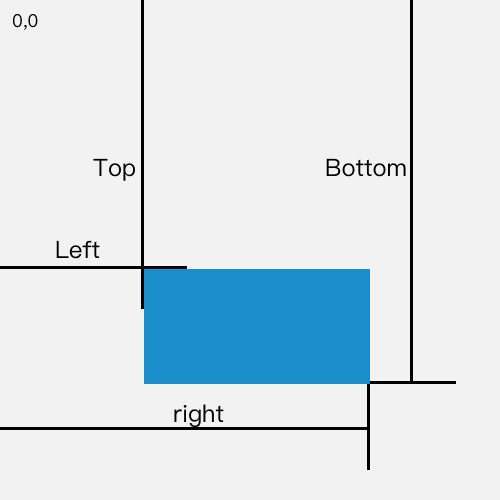
可以看出,top 属性代表了元素距离可视区域顶部的高度,正好可以为我们所用!

Lazy-Load 方法开工啦!

1
2
3
4
5
6
7
8
9
10
11
12
13
14
15
16
17
18
19
20
21
<script>
// 获取所有的图片标签
const imgs = document.getElementsByTagName('img')
// 获取可视区域的高度
const viewHeight = window.innerHeight || document.documentElement.clientHeight

function lazyload() {
for (let i = 0, len = imgs.length; i < len; i++) {
// 用可视区域高度减去元素顶部距离可视区域顶部的高度
let distance = viewHeight - imgs[i].getBoundingClientRect().top
// 如果可视区域高度大于等于元素顶部距离可视区域顶部的高度,说明元素露出
if (distance >= 0) {
// 给元素写入真实的src,展示图片
imgs[i].src = imgs[i].getAttribute('data-src')
}
}
}
lazyload();
// 监听Scroll事件
window.addEventListener('scroll', lazyload, false);
</script>

15.promise

promise出现的原因

如果我们想根据第一个网络请求的结果,再去执行第二个网络请求,那么会出现回调地狱

回调地狱带来的负面作用有以下几点:

  • 代码臃肿。
  • 可读性差。
  • 耦合度过高,可维护性差。
  • 代码复用性差。
  • 容易滋生 bug。
  • 只能在回调里处理异常。

API

  • Promise.resolve(value)

    类方法,该方法返回一个以value值解析后的Promise对象

    1. 参数是一个thenable对象,Promise.resolve方法会将这个对象转为Promise对象,然后就立即执行thenable对象的then方法。

      1
      2
      3
      4
      5
      6
      7
      8
      9
      let thenable = {
      then: function(resolve, reject) {
      resolve(42);
      }
      };
      let p1 = Promise.resolve(thenable);
      p1.then(function(value) {
      console.log(value); // 42
      });
    2. 如果传入的value本身就是Promise对象,那么Promise.resolve将不做任何修改、原封不动地返回这个实例。

    3. 如果参数是一个原始值,或者是一个不具有then方法的对象,则Promise.resolve方法返回一个新的Promise对象,状态为Resolved 。

      1
      2
      3
      4
      5
      let p = Promise.resolve('Hello');
      p.then(function (s){
      console.log(s)
      });
      // Hello
    4. 不带有任何参数

      Promise.resolve方法允许调用时不带参数,直接返回一个Resolved状态的Promise对象。

      1
      2
      3
      4
      5
      6
      7
      8
      setTimeout(function () {
      console.log('three');
      }, 0);
      Promise.resolve().then(function () {
      console.log('two');
      });
      console.log('one');
      //one two three
  • Promise.reject

    类方法,且与resolve唯一的不同是,返回的promise对象的状态为rejected。

  • Promise.prototype.then

    实例方法,为Promise注册回调函数,函数形式:fn(value){},value 是上一个任务的返回结果,then 中的函数一定要return一个结果或者一个新的Promise对象,才可以让之后的then回调接收。

  • Promise.prototype.catch

    Promise.prototype.catch方法是.then(null, rejection) 的别名,用于指定发生错误时的回调函数。

  • Promise.race

    Promise.race方法同样是将多个Promise实例,包装成一个新的Promise实例。返回率先改变状态的Promise结果,不管这个Promise结果是成功还是失败。

  • Promise.all

    类方法,多个Promise任务同时执行。如果全部成功执行,则以数组的方式返回所有Promise任务的执行结果。 如果有一个Promise任务rejected,则只返回rejected任务的结果

  • Promise.prototype.done

    Promise对象的回调链,不管以then方法或catch方法结尾,要是最后一个方法抛出错误,都有可能无法捕捉到(因为Promise内部的错误不会冒泡到全局)。因此,我们可以提供一个done方法,总是处于回调链的尾端,保证抛出任何可能出现的错误。

  • Promise.prototype.finally

    finally方法用于指定不管Promise对象最后状态如何,都会执行的操作。它与done方法的最大区别,它接受一个普通的回调函数作为参数,该函数不管怎样都必须执行。

实现

1
2
3
4
5
6
7
8
9
10
11
12
13
14
15
16
17
18
19
20
21
22
23
24
25
26
27
28
29
30
31
32
33
34
35
36
37
38
39
40
41
42
43
44
45
46
47
48
49
50
51
52
53
54
55
56
57
58
59
60
61
62
63
64
65
66
67
68
69
70
71
72
73
74
75
76
77
78
79
80
81
82
83
84
85
86
87
88
89
90
91
92
93
94
95
96
97
98
99
100
101
102
103
104
105
106
107
108
109
110
111
112
113
114
115
116
117
118
119
120
121
122
123
124
125
126
127
128
129
130
131
132
133
134
135
136
137
138
139
140
141
142
143
144
145
146
147
148
149
150
151
152
153
154
155
156
157
158
159
160
161
162
163
164
165
166
167
168
169
170
171
172
173
174
175
176
177
178
179
180
181
182
183
184
185
186
187
188
189
190
191
192
193
194
195
196
197
198
199
200
201
202
203
204
205
206
207
208
209
210
211
212
213
214
215
216
class Promise {
constructor(executor) {
//初始化state为等待态
this.state = 'pending';
this.value = undefined;
this.reason = undefined;
//为啥是数组而不是一个函数,主要是考虑的是一个promise有可能多次调用
this.onResolvedCallbacks = [];
this.onRejectedCallbacks = [];

let resolve = value => {
if (this.state === 'pending') {
this.state = 'fulfilled';
this.value = value;
// 一旦resolve执行,调用成功数组的函数
this.onResolvedCallbacks.forEach(fn => fn());
}
}

let reject = reason => {
if (this.state === 'pending') {
this.state = 'rejected';
this.reason = reason;
this.onRejectedCallbacks.forEach(fn => fn());
}
}
// 如果executor执行报错,直接执行reject
try {
executor(resolve, reject);
} catch (error) {
reject(error);
}
}
// then 方法 有两个参数onFulfilled onRejected
then(onFulfilled, onRejected) {
//对传入的两个参数做判断,如果不是函数将其转为函数 透传
//Promise.resolve(4).then().then((value) => console.log(value))
// onFulfilled如果不是函数,就忽略onFulfilled,直接返回value
onFulfilled = typeof onFulfilled === 'function' ? onFulfilled : value => value;
// onRejected如果不是函数,就忽略onRejected,直接扔出错误
onRejected = typeof onRejected === 'function' ? onRejected : err => {
throw err
};
//声明返回的promise2
let promise2 = new Promise((resolve, reject) => {
// 状态为fulfilled,执行onFulfilled,传入成功的值
if (this.state === 'fulfilled') {
//异步 因为下面要用到promise2,所以用异步让其进入下一轮事件循环
setTimeout(() => {
try {
let x = onFulfilled(this.value);
resolvePromise(promise2, x, resolve, reject);
} catch (e) {
reject(e);
}
}, 0)
}
// 状态为rejected,执行onRejected,传入失败的原因
if (this.state === 'rejected') {
setTimeout(() => {
try {
let x = onRejected(this.reason);
resolvePromise(promise2, x, resolve, reject);
} catch (e) {
reject(e);
}
}, 0)
}
// 当状态state为pending时
if (this.state === 'pending') {
//当resolve在setTomeout内执行,then时state还是pending等待状态
//我们就需要在then调用的时候,将成功和失败存到各自的数组,
//一旦reject或者resolve,就调用它们
this.onResolvedCallbacks.push(() => {
setTimeout(() => {
try {
//这个返回的值用来作为传递给下一个then的值
let x = onFulfilled(this.value);
resolvePromise(promise2, x, resolve, reject);
} catch (e) {
reject(e);
}
}, 0)
})

this.onRejectedCallbacks.push(() => {
setTimeout(() => {
try {
let x = onRejected(this.reason);
resolvePromise(promise2, x, resolve, reject);
} catch (e) {
reject(e);
}
}, 0)
})
}
})
//返回promise,完成链式
//主要是为了解决链式调用new Promise().then().then()
return promise2;
}

catch (fn) {
return this.then(null, fn);
}

done(onFulfilled, onRejected) {
this.then(onFulfilled, onRejected).catch(function (reason) {
// 抛出一个全局错误
setTimeout(() => {
throw reason
}, 0)
})
}

// 将 promise对象的原数据继续向下传递,
// 失败数据则需要抛出供后续catch 使用
finally(callback) {
return this.then(val => {
return Promise.resolve(callback()).then(() => val)
}, err => {
return Promise.resolve(callback()).then(() => {
throw err
})
})
}
}
//让不同的promise代码互相套用,叫做resolvePromise
function resolvePromise(promise2, x, resolve, reject) {
//循环引用报错
if (x === promise2) return reject(new TypeError('循环引用'));
//防止多次调用
let called;

if (x !== null && (typeof x === 'object' || typeof x === 'function')) {
try {
// A+规定,声明then = x的then方法
let then = x.then;
//then有可能只是属性值,不是方法,直接resolve
// 如果then是函数,就默认是promise了
if (typeof then === 'function') {
// 就让then执行 第一个参数是this 后面是成功的回调 和 失败的回调
then.call(x, y => {
// 成功和失败只能调用一个
if (called) return;
called = true;
// resolve的结果依旧是promise 那就继续解析
resolvePromise(promise2, y, resolve, reject);
}, err => {
// 也属于失败
if (called) return;
called = true;
// 取then出错了那就不要在继续执行了
reject(err);
})
} else {
resolve(x);
}
} catch (e) {
if (called) return;
called = true;
reject(e);
}
} else {
resolve(x);
}
}

Promise.resolve = function (val) {
return new Promise((resolve, reject) => {
resolve(val);
})
}
Promise.reject = function (val) {
return new Promise((resolve, reject) => {
reject(val);
})
}
Promise.race = function (promises) {
return new Promise((resolve, reject) => {
for (let i = 0; i < promises.length; i++) {
promises[i].then(resolve, reject);
}
})
}
//all方法(获取所有的promise,都执行then,把结果放到数组,一起返回)
Promise.all = function (promises) {
return new Promise((resolve, reject) => {
let resolvedCount = 0,
promiseNum = promises.length,
resolveValue = [];
for (let i = 0; i < promisesNum; i++) {
//MyPromise.resolve()方法把不是MyPromise的参数转为MyPromise对象。
Promise.resolve(promises[i]).then((value) => {
resolveValue[i] = value;
resolvedCount++;
if (resolvedCount === promisesNum) return resolveValue;
}, (reason) => {
return reject(reason);
})
}
})
}

Promise.defer = Promise.deferred = function () {
let dfd = {}
dfd.promise = new Promise((resolve, reject) => {
dfd.resolve = resolve
dfd.reject = reject
})
return dfd
}

module.exports = Promise;

//promises-aplus-tests promise.js

16.异步手写代码

实现一个sleep函数

Promise

1
2
3
4
5
6
7
const sleep = time => {
return new Promise((resolve, reject) => {
setTimeout(resolve, time);
})
}

sleep(1000).then(() => console.log(1));

Generator

1
2
3
4
5
6
7
8
9
function* sleep(time) {
yield new Promise(resolve => {
setTimeout(resolve, time)
})
}
//next()返回的是一个generator
sleep(1000).next().value.then(() => {
console.log(1)
})

Async

1
2
3
4
5
6
7
8
9
10
11
async function sleep(time, func) {
await new Promise((resolve) => {
setTimeout(resolve, time);
})
return func();
}


sleep(1000, () => {
console.log(1)
})

ES5

1
2
3
4
5
6
7
8
9
function sleep(time, cb) {
if (typeof cb === 'function') {
setTimeout(cb, time);
}
}

sleep(1000, () => {
console.log(1)
})

实现每隔一秒钟输出1,2,3…数字

1
2
3
4
5
for (let i = 0; i < 10; i++) {
setTimeout(() => {
console.log(i + 1);
}, i * 1000);
}
1
2
3
4
5
6
7
8
9
10
11
12
13
14
Promise.resolve()
.then(() => {
return new Error('error!!!')
})
.then((res) => {
console.log('then: ', res)
})
.catch((err) => {
console.log('catch: ', err)
})
-----------------------------------
then: Error: error!!!
at Promise.resolve.then (...)
at ...复制

.then 或者 .catch 中 return 一个 error 对象并不会抛出错误,所以不会被后续的 .catch 捕获,需要改成其中一种:

1
2
return Promise.reject(new Error('error!!!'))
throw new Error('error!!!')复制代码

因为返回任意一个非 promise 的值都会被包裹成 promise 对象,即 return new Error('error!!!') 等价于 return Promise.resolve(new Error('error!!!'))

1
2
3
4
5
6
const promise = Promise.resolve()
.then(() => {
return promise
})
promise.catch(console.error)
//TypeError: Chaining cycle detected for promise #<Promise>

.then.catch 返回的值不能是 promise 本身,否则会造成死循环。

1
2
3
4
5
Promise.resolve(1)
.then(2)
.then(Promise.resolve(3))
.then(val => console.log(val))
//1

.then 或者 .catch 的参数期望是函数,传入非函数则会发生值穿透。

1
2
3
4
5
6
7
8
9
10
11
12
13
14
15
16
process.nextTick(() => {
console.log('nextTick')
})
Promise.resolve()
.then(() => {
console.log('then')
})
setImmediate(() => {
console.log('setImmediate')
})
console.log('end')
-------------------------
end
nextTick
then
setImmediate

process.nextTickpromise.then 都属于 microtask,而 setImmediate 属于 macrotask,在事件循环的 check 阶段执行。事件循环的每个阶段(macrotask)之间都会执行 microtask,事件循环的开始会先执行一次 microtask。

1
2
3
4
5
6
7
8
9
10
11
12
13
14
15
16
17
18
const promise = new Promise((resolve, reject) => {
setTimeout(() => {
console.log('once')
resolve('success')
}, 1000)
})

const start = Date.now()
promise.then((res) => {
console.log(res, Date.now() - start)
})
promise.then((res) => {
console.log(res, Date.now() - start)
})
----------------
once
success 1008
success 1009

promise 的 .then 或者 .catch 可以被调用多次,但这里 Promise 构造函数只执行一次。或者说 promise 内部状态一经改变,并且有了一个值,那么后续每次调用 .then 或者 .catch 都会直接拿到该值。

1
2
3
4
5
6
7
8
9
10
var p1 = new Promise(function (resolve, reject) {
setTimeout(() => reject(new Error('fail')), 3000)
})
var p2 = new Promise(function (resolve, reject) {
setTimeout(() => resolve(p1), 1000)
})
p2
.then(result => console.log(result))
.catch(error => console.log(error))
// Error: fail

上面代码中, p1是一个Promise,3秒之后变为rejected 。p2的状态在1秒之后改变, resolve 方法返回的是 p1 。此时,由于p2返回的是另一个Promise,所以后面的then语句都变成针对后者( p1 )。又过了2秒,p1 变为rejected ,导致触发catch方法指定的回调函数。

每间隔3s输出

1
2
3
4
5
6
7
8
9
10
11
function repeat(func, times, wait) {

}
// 输入
const repeatFunc = repeat(alert, 4, 3000);

// 输出
// 会alert4次 helloworld, 每次间隔3秒
repeatFunc('hellworld');
// 会alert4次 worldhellp, 每次间隔3秒
repeatFunc('worldhello')
1
2
3
4
5
6
7
8
9
10
11
12
13
14
function repeat(func, times, s) {
return function (...args) {
for (let i = 0; i < times; i++) {
setTimeout(() => {
func.apply(null, args);
}, s * i);
}
}
}

let log = console.log
let repeatFunc = repeat(log, 4, 3000)
repeatFunc('HelloWorld')
repeatFunc('WorldHello')
1
2
3
4
5
6
7
8
9
10
11
12
13
14
15
16
17
18
19
async function wait(seconds) {
return new Promise((res) => {
setTimeout(res, seconds);
});
}

function repeat(func, times, s) {
return async function (...args) {
for (let i = 0; i < times; i++) {
func.apply(null, args);
await wait(s);
}
};
}

let log = console.log
let repeatFunc = repeat(log, 4, 3000)
repeatFunc('HelloWorld')
repeatFunc('WorldHello')
-------------本文结束感谢您的阅读-------------